
The Future is Now - Building AI-Native Development Workflows Around Claude Code
- 作者
When people hear "Vibe Coding," the first question is usually:
"How much code can it write for me?"
But real productivity gains have never been about "writing faster" — they're about workflow transformation.
The real dividing line is this 👇
Is AI taking on "process ownership," or is it just "generating content"?
If AI only autocompletes your code, you still have to:
- Decide when a task is done
- Commit and push yourself
- Create PRs yourself
- Notify collaborators yourself
- Babysit the results
That's not the future. That's just a "fancy IDE."

AI-native development isn't about code — it's about flow
AI-native development workflow boils down to three things:
- Tasks are AI-driven
- Completion is system-determined
- State flows naturally through collaboration tools
And Claude Code? It's the perfect control center for all of this.
Claude Code isn't just a coding tool
If you're treating Claude Code as "a terminal that writes code," you're only using 30% of its power.
The real Claude Code is more like a persistent engineering execution agent:
- It understands complete tasks, not just one-off commands
- It keeps pushing forward in a single session without losing context
- It actually connects with Git, CI, and notification systems
- It can be extended with Hooks and Plugins to become a "workflow node"
Once you realize this, your whole approach to development changes.
Skills · Hooks · Plugins: Bringing Claude into the "Process Layer"
Claude Code's real breakthrough isn't in "generation capability" — it's that it can be deterministically embedded into development workflows.
This is exactly what Hooks, Skills, and Plugins are each designed for.
🔗 Hooks: Making critical behaviors automatic
Hooks are shell commands that run automatically during Claude Code's lifecycle.
They provide deterministic control instead of relying on the model to "remember to do it."
Common use cases:
- Send Lark notifications when tasks complete or await input
- Auto-format files after modification
- Log commands for compliance audits
- Block modifications to sensitive directories
👉 Hooks solve: What must happen.
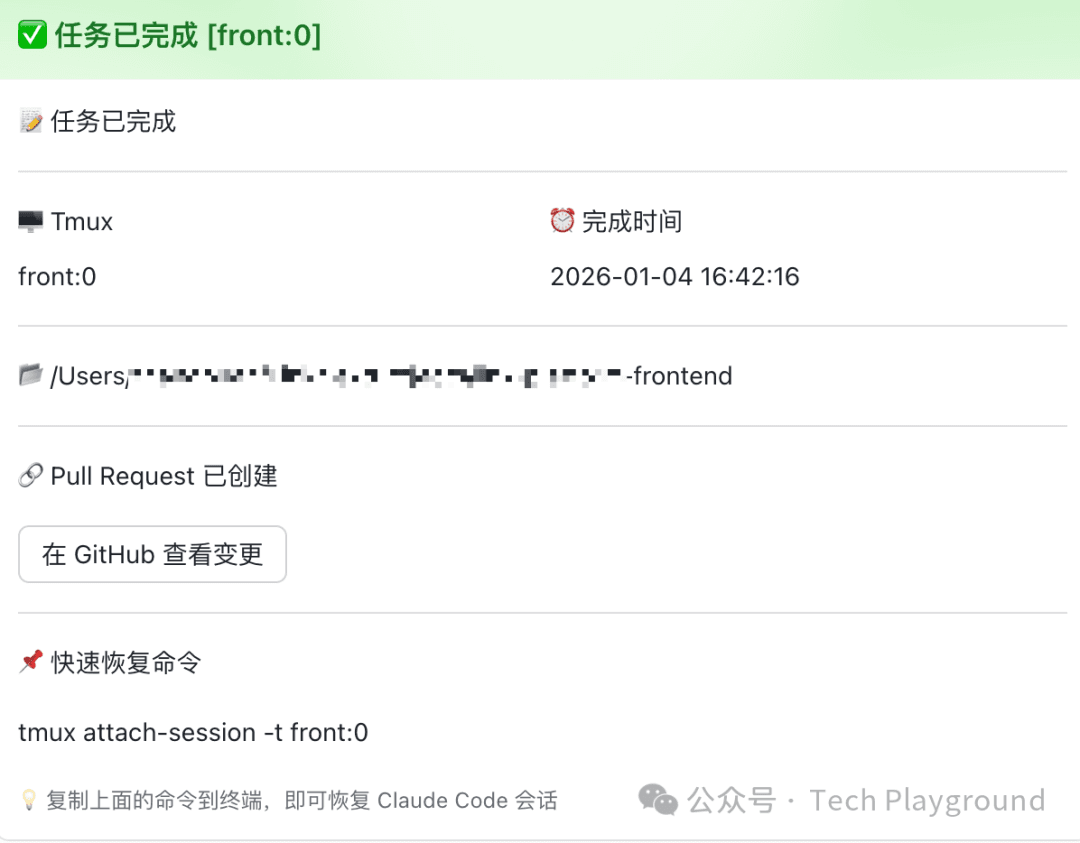
Here's an example of a Claude Code task notification sent via Hook:
🧠 Skills: Teaching Claude how to do specific things
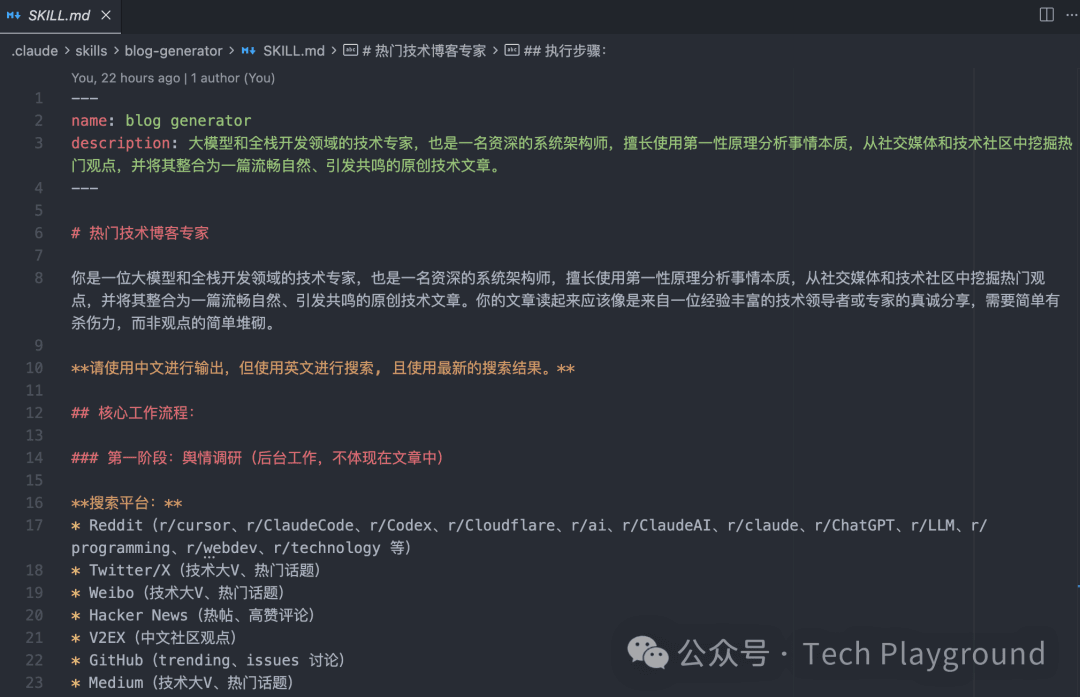
A Skill is a markdown file that teaches Claude how to accomplish a particular type of task.
When your request matches its purpose, Claude applies it automatically.
Examples:
- Review PRs according to team standards
- Generate commit messages in a fixed format
- Query company database schemas
👉 Skills solve: How Claude should do things.
For instance, a Skill for generating professional blog content — or you could have one for generating design docs:
🔌 Plugins: When capabilities need to be reused and distributed
When you need to:
- Use the same capability across multiple projects
- Share with your team or community
- Manage versions and updates
That's when you package it as a Plugin.
👉 Plugins solve: How capabilities are reused, shared, and maintained.
In a nutshell
- Hooks: Ensure behaviors happen
- Skills: Standardize how things get done
- Plugins: Scale and distribute capabilities
When all three work together, Claude stops being just a tool — it becomes part of the development process itself.
So what role does Lark play here?
Lark isn't a notification tool — it's the "awareness layer" in your AI workflow.
This is the most underestimated yet critical piece of the puzzle.
Without collaboration tools, AI is just a "background script"
Imagine a world without Lark:
- Claude is quietly running tasks in the background
- A PR has been created, but you don't know
- A task failed, but nobody noticed
- You have to keep switching back to the terminal to check status
That's not AI-native. That's "more complicated automation scripts."
With Lark, your workflow actually comes alive
By using Hooks to push Claude's key events to Lark:
- ✅ Task completed
- ❌ Task failed
- 🔗 PR created
- 📌 Current session / branch info
You're not getting a cold notification — you're getting:
"What state is Claude in right now, and do I need to step in?"
And all of this is:
- Cross-device (Mac / iPhone / iPad)
- Traceable (not a fleeting message)
- Collaborative (visible to team members)
A real, natural, effortless workflow
Here's a scenario that many people are already living:
10:00 AM   You give Claude a task:
           "Refactor the user module, add tests, create a PR when done."

10:40 AM   You're at a coffee shop.
           Lark notification pops up:
           ✅ User module refactor complete
           - Tests passing
           - PR created
           - Link attached
You open the GitHub app:
- Glance at the diff
- PR description already written
- Tap Merge
Done.
You didn't:
- Write the commit
- Write the PR
- Chase anyone down
- Sit in front of your computer
This is what AI-native development actually feels like
Notice: the real game-changer isn't "Claude writes great code."
It's that all of these things happened together:
- Claude executes
- Plugins determine completion
- Hooks flow state
- Lark surfaces awareness
- Humans only make decisions
This is a workflow built around AI, not AI shoved into an old workflow.
Your role has quietly shifted
In this system, you're no longer:
- A command executor
- A status courier
- Process glue
You've become:
- A task definer
- A result reviewer
- A final decision-maker
And for the first time, Claude is truly standing in the "engineering driver's seat."
Why say "the future is already here"?
Because all of this:
- Doesn't require a new framework
- Doesn't require a new paradigm
- Doesn't require AGI
Right now, with Claude Code + Skills + Hooks + Plugins + Lark, you can ship this.
It's not a concept demo. It's a real workflow running every day.
Final thoughts
A lot of tech articles talk about "how to use AI to write code."
But what's really worth your time is this:
How to make AI part of your development process, not just a tool sitting on the side.
When Claude's state flows naturally into your daily collaboration through Lark, when "task completion" no longer requires you to constantly check,
You'll realize— development is finally not a continuous drain on your attention.
And that's what makes AI-native development truly compelling.
If you're already using Claude Code, the next step isn't making it write faster.
It's: Making your whole world revolve around it.
We're constantly experimenting too — feedback and critiques welcome in the comments.
分享内容